Microsoft 365 Copilot readiness matters more than most businesses realize.
Before you deploy the paid version of Microsoft 365 Copilot to your users, it’s worth slowing down. Copilot does not fix messy IT environments. Instead, it reflects them.
Once deployed, Copilot can see emails, files, meetings, chats, and documents exactly as your users can today. As a result, any existing problems become visible very quickly.
This guide explains what businesses should do before deploying Microsoft 365 Copilot, so Copilot improves productivity instead of creating risk.
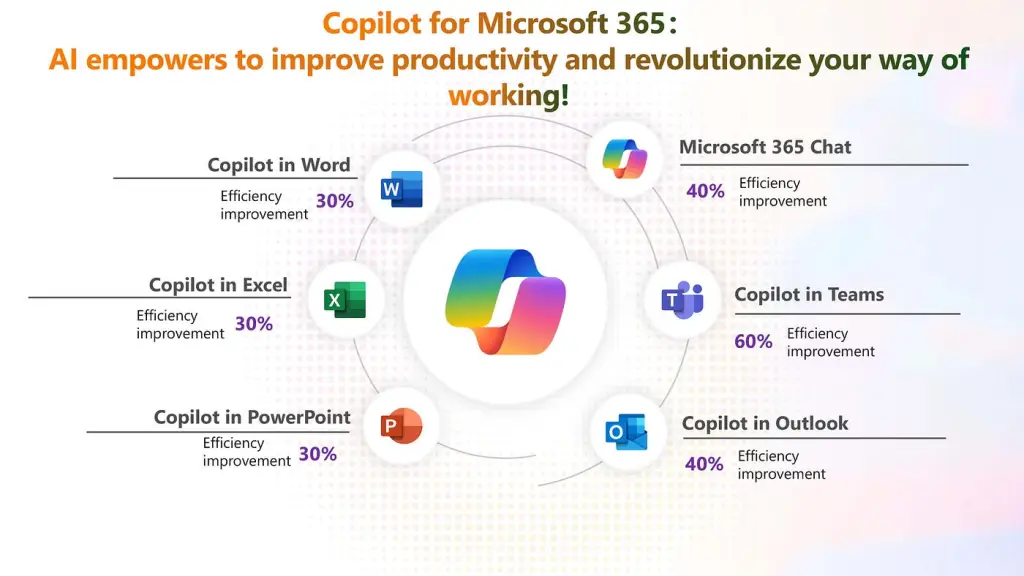
Microsoft 365 Copilot Chat vs. Microsoft 365 Copilot: What’s the Difference?
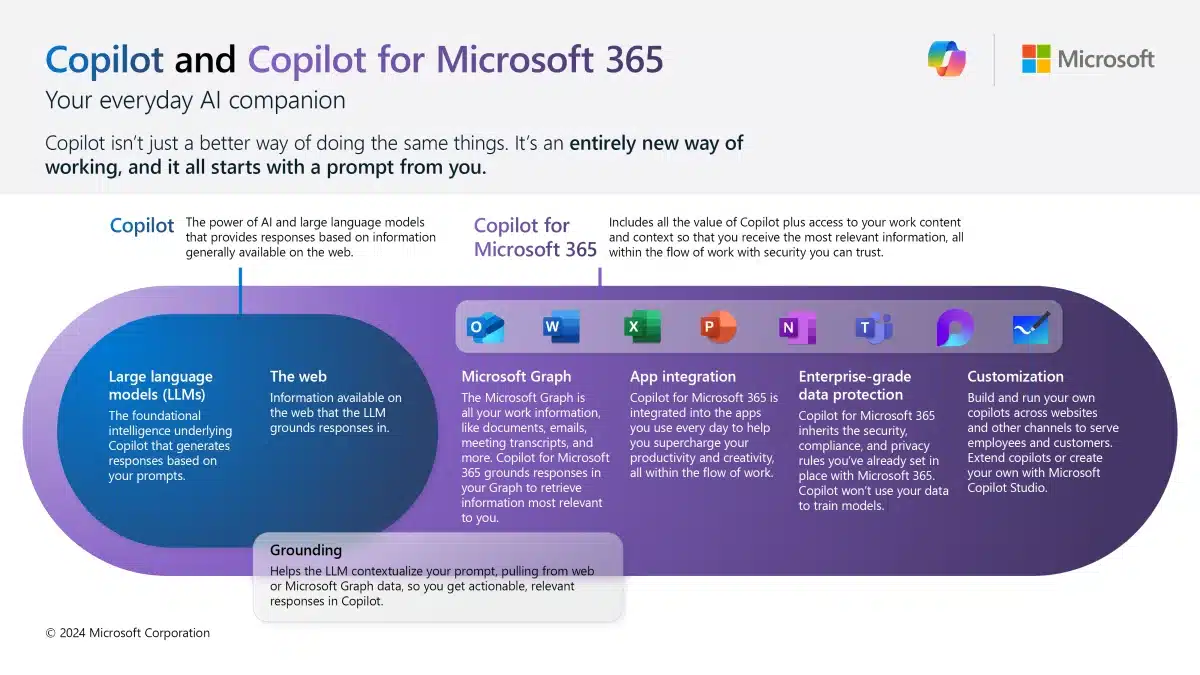
Microsoft uses the name “Copilot” for more than one tool, which is where a lot of confusion starts.
Before we talk about readiness, it’s important to understand the difference between Microsoft 365 Copilot Chat and Microsoft 365 Copilot — because they are not the same thing, and they carry very different implications for your business.
Microsoft 365 Copilot Chat (Included with Microsoft 365)
Microsoft 365 Copilot Chat is a secure AI chat experience that’s included with most Microsoft 365 business plans.
It’s best thought of as:
- A general AI assistant
- Grounded in web content
- Secure and safe to use for work
- Useful for brainstorming, drafting, and summarizing content you manually provide
Copilot Chat does not automatically see your emails, Teams chats, calendars, or files. Unless a user uploads or pastes something into the chat, Copilot Chat stays largely isolated from your internal data.
This makes it a low‑risk entry point for organizations that want to explore AI without exposing internal systems.
Microsoft 365 Copilot (Paid Add‑On License)
Microsoft 365 Copilot is the paid version that most people are referring to when they talk about “rolling out Copilot.”
This version is:
- Deeply embedded in Word, Excel, Outlook, Teams, SharePoint, and OneDrive
- Grounded in your actual organizational data
- Able to summarize meetings, scan email threads, analyze documents, and surface internal information automatically
- Licensed per user, as an add‑on to your existing Microsoft 365 plan
In other words, Microsoft 365 Copilot doesn’t wait for users to paste content in — it works across the data they already have access to.
This is where productivity gains are real — and where readiness becomes critical.
Why this distinction matters
Copilot Chat is forgiving.
Microsoft 365 Copilot is not.
Because Microsoft 365 Copilot works directly with your internal data:
- Existing permission issues become visible
- Overshared files surface quickly
- Poor data organization hurts results
- Security gaps are amplified, not hidden
That’s why Microsoft 365 Copilot readiness matters before licenses are assigned. Copilot builds on your current environment — it doesn’t clean it up for you.
Quick rule of thumb
If you’re:
- Experimenting with AI → Copilot Chat is a safe place to start
- Planning real productivity gains → Microsoft 365 Copilot requires preparation
Not sure which Copilot your business is using?
We can help confirm what’s enabled today and whether your environment is ready for the full Microsoft 365 Copilot experience.
How Microsoft 365 Copilot actually works
Microsoft 365 Copilot works inside your existing Microsoft 365 environment.
It:
- Uses current user permissions
- Respects existing access controls
- Does not bypass security
However, this creates an important reality.
If users already have access to too much information, Copilot will surface that information instantly. Because of this, Microsoft 365 Copilot readiness depends heavily on how clean your environment is today.
Step 1: Fix oversharing before deploying Microsoft 365 Copilot
Most organizations struggle with oversharing.
For example:
- Finance or HR folders are accessible to too many users
- Old Teams and SharePoint sites still exist
- Permissions were granted temporarily and never reviewed
Before deploying Microsoft 365 Copilot, businesses should review who can see what. Otherwise, Copilot will expose these access issues to users in seconds. Microsoft 365 access controls are critical.
This is one of the most important Microsoft 365 Copilot readiness steps.
Step 2: Organize where business data lives
Copilot works best when data is organized and current.
Before deployment, businesses should:
- Define where authoritative documents live
- Reduce duplicate files
- Retire unused SharePoint sites
- Avoid storing important files in email inboxes
Although this work feels unexciting, it directly impacts Copilot results. Clean data leads to better answers. Disorganized data leads to frustration. Learn more about getting better value from Microsoft 365.
Step 3: Separate sensitive data from everyday files
Microsoft 365 Copilot can access any file a user can access.
Because of that, businesses should clearly separate:
- Client data
- Employee records
- Financial information
- Contracts and legal documents
Sensitive information should not live beside everyday working files. Without this separation, Copilot may surface confidential data in the wrong context.
Strong Microsoft 365 Copilot readiness includes clear information boundaries. Understanding the CIS Framework and How Invicta IT Solutions Can Help Your Business Stay Secure.
If you’re unsure whether your Microsoft 365 setup is ready for Copilot, this is usually the point where a short readiness review can prevent bigger issues later.
Step 4: Secure devices before enabling Copilot
Copilot surfaces data to users. However, users access that data from devices.
If devices are unmanaged or poorly secured, Copilot increases risk instead of reducing effort.
Before deploying Microsoft 365 Copilot, businesses should confirm:
- Devices meet security standards
- Sign‑in protections are enforced
- Company data remains protected if a device is lost
Skipping this step weakens every other readiness effort.
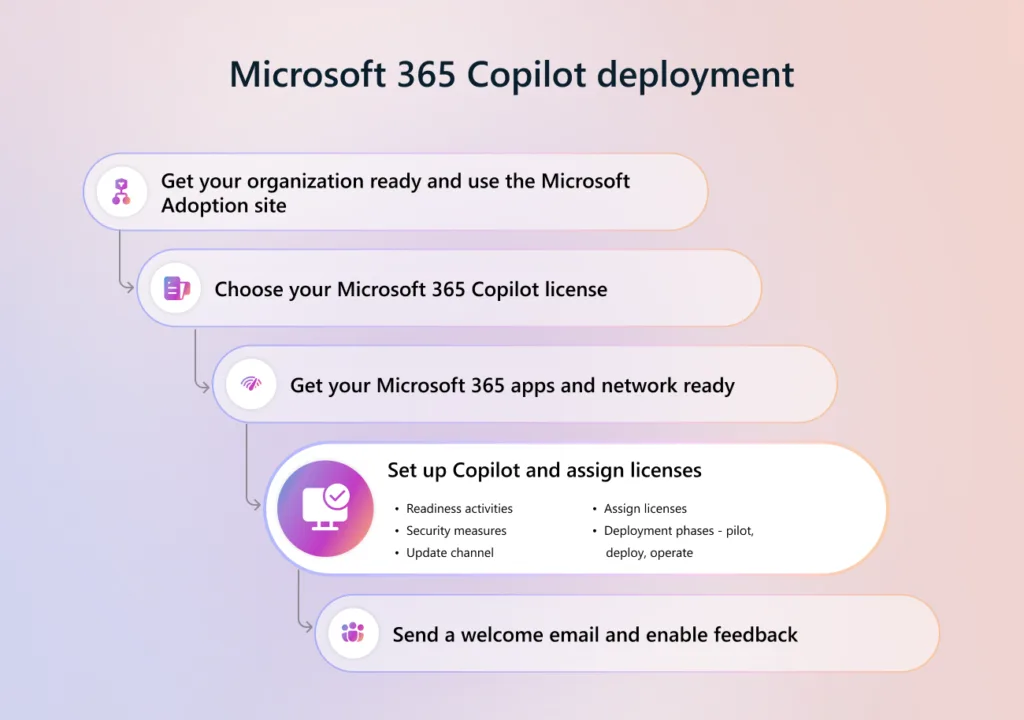
Step 5: Avoid deploying Copilot to everyone at once
Deploying Microsoft 365 Copilot to all users on day one is a mistake.
Instead, businesses should:
- Start with a small pilot group
- Include users from different roles
- Observe what Copilot surfaces
- Fix issues early
- Expand gradually
This approach improves adoption and reduces risk.
Step 6: Define success before assigning Copilot licenses
Before purchasing or assigning Copilot licenses, it helps to ask:
- What tasks should take less time?
- What work feels frustrating today?
- How will we know Copilot is helping?
Without clear goals, Copilot often feels underwhelming. With clear goals, it becomes far more valuable.
A simple Microsoft 365 Copilot readiness check
If you are unsure about any of the following, pause before deployment:
- Permissions are clean and intentional
- Sensitive data is clearly separated
- Devices are secured
- A pilot group is defined
- Success criteria are documented
Microsoft 365 Copilot builds on your foundation. It does not repair it.
Final thoughts on Microsoft 365 Copilot readiness
Microsoft 365 Copilot can deliver real productivity gains. However, only prepared environments benefit fully.
The most successful deployments:
- Clean up first
- Secure first
- Pilot first
- Expand second
If you want Copilot to reduce stress instead of introducing risk, Microsoft 365 Copilot readiness must come before licenses.
Thinking about Microsoft 365 Copilot?
If you’re considering Microsoft 365 Copilot and want to be confident it’s deployed securely and effectively, we can help review your environment before licenses are assigned.
We’ll look at permissions, data layout, device security, and rollout approach so Copilot delivers value — not surprises.
FAQ: Microsoft 365 Copilot Readiness
Is Microsoft 365 Copilot secure to deploy right away?
Microsoft 365 Copilot respects your existing Microsoft 365 permissions and security controls. However, Copilot reflects the environment as it exists today. If users already have access to too much information, Copilot will surface it. This is why Microsoft 365 Copilot readiness is critical before deployment.
Do we need to clean up permissions before deploying Microsoft 365 Copilot?
Yes. Copilot only sees what users can already access. If permissions are messy, outdated, or overly broad, Copilot will expose those issues immediately. Reviewing and tightening access before deployment is one of the most important readiness steps.
Will Copilot show confidential or sensitive data to users?
Copilot can surface any data a user already has permission to view. If sensitive information is stored alongside everyday files, Copilot may surface it in unexpected contexts. Separating and protecting sensitive data is an essential part of Microsoft 365 Copilot readiness.
Should we deploy Microsoft 365 Copilot to everyone at once?
No. Most successful deployments start with a small pilot group. This allows businesses to see what Copilot surfaces, fix issues early, and refine usage before expanding access to more users.
Do our devices matter when deploying Copilot?
Yes. Copilot surfaces company data to users, but users access that data from devices. If devices are unmanaged or poorly secured, Copilot increases risk. Device security is a core part of Microsoft 365 Copilot readiness.
What Microsoft 365 licenses are required before adding Copilot?
Users must already have the required base Microsoft 365 licenses and services in place before Copilot can be enabled. Copilot is an add‑on, not a replacement for core Microsoft 365 licensing.
How do we know if Microsoft 365 Copilot is actually helping?
Before deployment, businesses should define what success looks like. That might include saving time on emails, improving meeting summaries, or reducing manual reporting work. Without clear goals, Copilot’s value is harder to measure.
What is the biggest mistake businesses make with Copilot?
The biggest mistake is assuming Copilot will fix existing problems. Copilot builds on your current Microsoft 365 environment. If that foundation is messy, Copilot will make the mess more visible — not less.
Is Microsoft 365 Copilot a one‑time setup?
No. Copilot adoption is ongoing. As users change how they work, permissions, data organization, and security controls should evolve as well. Treating Copilot as a “set it and forget it” tool limits its value.
What should we do first if we’re unsure about Copilot readiness?
Start with a readiness review. That includes permissions, data locations, device security, and a small pilot plan. This approach reduces risk and improves long‑term results.
If Microsoft 365 Copilot is on your roadmap and you want help planning a clean rollout, we’re happy to talk through what readiness looks like for your business.